Hauptwerk Software and the Practice Organ
Hauptwerk is a software package that permits a musician to play a digitally-sampled pipe organ by means of a keyboard equipped with midi connections. Many electronic home organs have this capability, and the sound that results will normally be a great improvement.
The most concise way to summarize Hauptwerk’s capabilities can be found here in its Wikipedia entry. (GrandOrgue, described here, is another version of virtual organ software.)
This note describes a specific installation of Hauptwerk on a Johannus Opus 370 organ. Other chapter members are encouraged to submit comments about their experiences with virtual organ software in the home or comments on whatever practice instrument they are using.
In addition to adding a new dimension to the sound of a home (practice) organ, the Hauptwerk software is capable of driving multiple speakers and amplifiers in a large space to reproduce any number of notable American and European organs. Basically, a Hauptwerk “installation” consists of the Hauptwerk software, one or more digitally sampled organs, a touch screen laptop (fast with a great deal of RAM), a midi interface cable, and something to turn it all into sound, such as headphones or an audio interface, amplifiers and speakers. Of course, you must have an electronic organ that has a stop labeled “Midi” in each division. Success with installing and setting all this up depends on one’s persistence, patience and level of frustration tolerance.
There is an abundance of information on Hauptwerk software both in websites and on YouTube. For a simple introduction to the absolute basics on YouTube, see “How to control Hauptwerk From a Commercial organ.” The software, especially the Lite version is almost plug and play for basic operation. Another kind of application can be found at “The 2020 John Knox Antiphonal Organ” on YouTube.
Other organ sample sets, including pictures and audio recordings can be found online at numerous websites. For instance. Piotr Grabowski offers some excellent free sample sets, and Paramount Organ Works offers a 10-rank composite theater organ for no charge.
Hauptwerk software includes an “Audio and Perspective Mixer” that enables the user to direct a division, a group of pipes or individual pipes to any output channel, applying any of a wide array of reverberation suites to each channel. This allows the user to construct a number of acoustic perspectives, and after a bit of experimentation can allow you to think you are in a vast cathedral or an intimate chapel. It is rich with features and complexities, but finding out exactly how to do one particular thing is like finding a needle in a needle stack. The full version of the software also allows you to adjust the volume of individual stops or pipes (but not the individual pipes in a mixture), set the organ’s pitch, and apply any of a number of temperaments and reverberation profiles. You can add pistons to organs that have none or increase the number of existing pistons.
Although my use of the Hauptwerk software and a collection of digitally sampled organs has provided a home practice organ with rich and varied capabilities, my interests now are more about tonal design and trying to understand or even improve the sampled organs in my collection. I started with a three-manual Johannus Opus 370. There are two expression pedals, 8 pistons per division plus 8 generals, a crescendo pedal, minimal couplers repeated in toe pistons. The manuals and pedal are easily linked to Hauptwerk as are each of the pistons. Stops are controlled from a laptop’s touch screen (plus an added Novation Launchpad, pistons, or a sequencer in the Hauptwerk software.
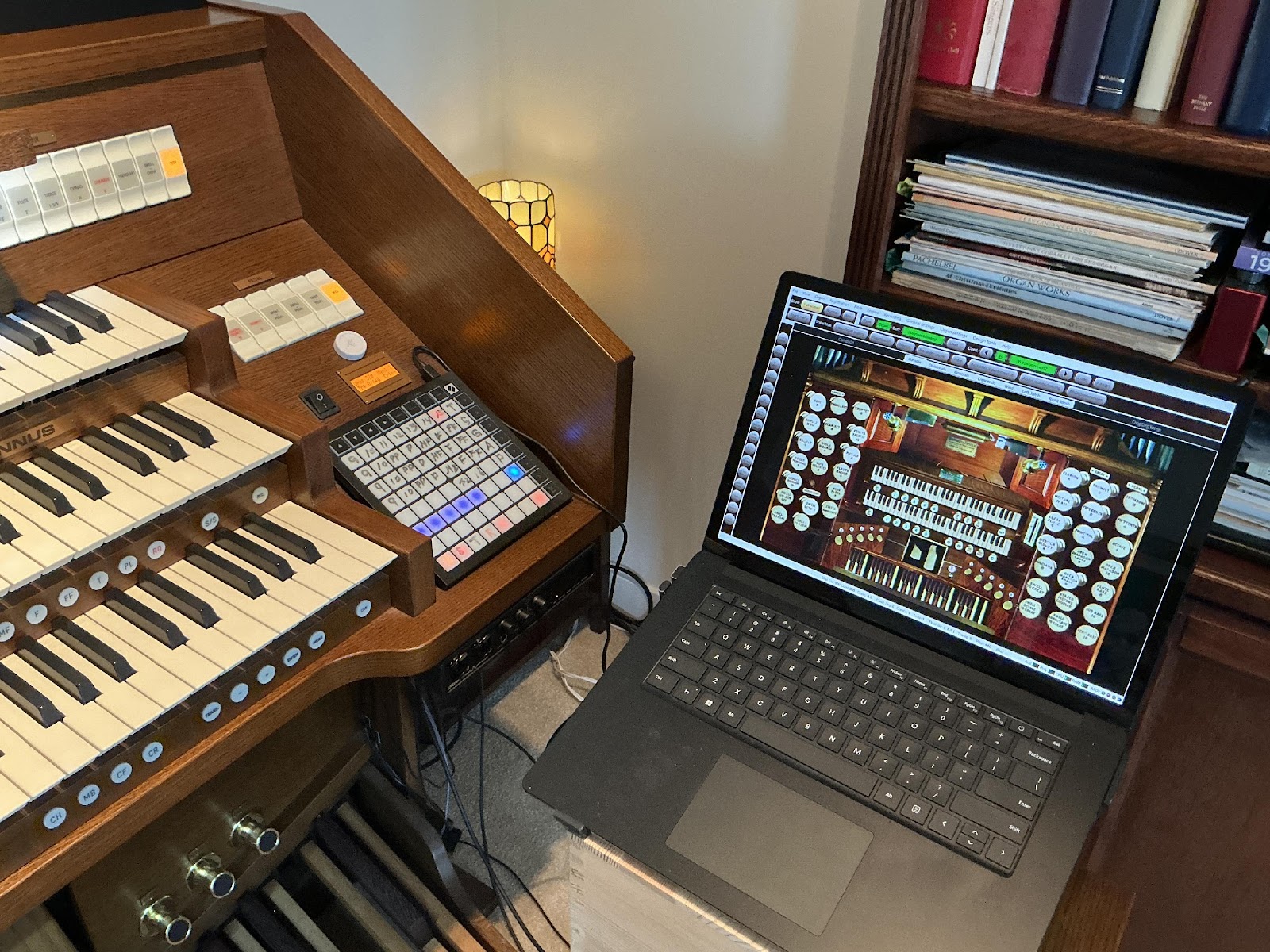
All is not peachy keen, however. The greatest pro is that Mr. Johannus now sounds like a real, soul-satisfying pipe organ. As of Hauptwerk Version 8, the Johannus crescendo pedal cannot be connected to a sampled organ’s crescendo pedal (if any). The biggest drawback is that the rocker tabs that control the Johannus stops cannot be satisfactorily connected to the sample organs and would not be informative if they did. Thus, stops have to be controlled by pistons or on the touch screen of the laptop. One can adapt to this by making sure the screen is supported from behind and placing the laptop where it can be reached easily and by adding additional control devices such as a Novation Launchpad. Of course it is possible to spend considerably more money and add a pair of touch screens that display the stop jambs of the sampled organ’s console.
What does a virtual organ cost? GrandOrgue is free but not as powerful or capable as Hauptwerk, nor does it have the same rich collection of sample sets as Hauptwerk—but it is free. The minimum you can spend for Hauptwerk is $249.00 for the Lite Edition of Version 9. This would provide you with the ability to play the included St. Anne, Moseley (Birmingham, UK) organ in stereo without the ability to change any part of it. If you already have a touch screen laptop with enough RAM and high quality headphones or possibly a stereo, you are ready to go. The full version of the software is $599.00. One can use and explore all parts of the full version free for 14 days. Sample sets range from free to more than a thousand dollars. Experiencing the free version first tests not only the software, but also your ability to download it, install it, hook up a midi adapter cable, evaluate your computer’s digital-audio converter, and successfully enter a passcode into the iLok software to unlock the Hauptwerk software and many of the sample sets you might ultimately use. There is lots of help with forums, YouTubes, and a well-written set of instructions.
The organs in the sample sets each deserve a description and a separate review. Implementation of the software can be tedious, but the end result is definitely worth it.
Please, if you have experiences to share detailing your off-the-job practice instruments—electronic or pipe—submit an article to Overtones. If you have any questions, please email me at temp@scronx.com.